WeatherPop Español (Aviso)
WeatherPopWeather
4.612.00 Reviews
- Version
- 0.10.3.5
- Installs
- 50.00K
- Age Rating
- Everyone
Screenshots
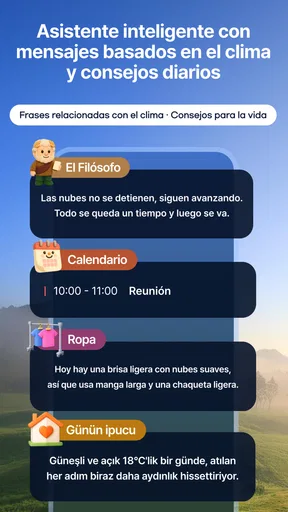
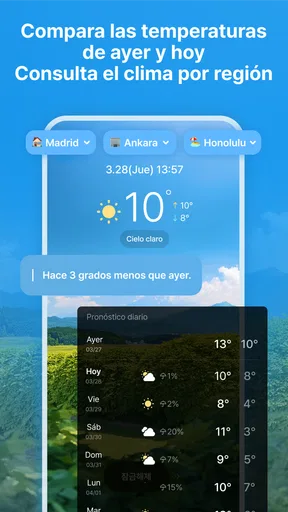
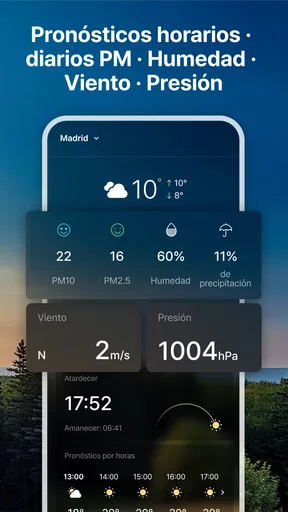

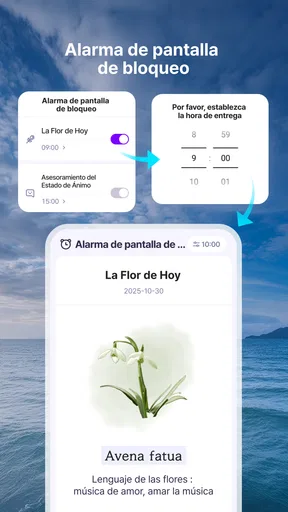
Our Review of WeatherPop Español (Aviso)
 Analysis by Appyee
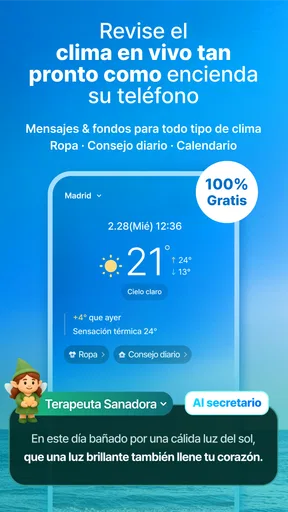
I tested WeatherPop Español as a practical weather app for everyday decisions, and its appeal became clearer when I used it around a shared household rather than as a personal gadget. One person can check the forecast before leaving for work, another can look before taking children outside, and someone else can use it to decide whether laundry or errands should wait. That simple pattern is where this app makes the most sense: it turns weather checking into a quick shared habit without asking anyone to pay for access.
WeatherPop Español is a free weather app from WeatherPop, with a 4.6 average from around 335 ratings and over 50 thousand installs. It is rated for Everyone, which suits a phone that may be passed between adults, teenagers, or younger users who only need a clear answer about the day. The store identifies it as “WeatherPop Español,” so I approached it primarily as a Spanish-language weather experience rather than as a broad, feature-heavy international weather platform.
How WeatherPop Español fits into a shared household
The most useful household scenario is not dramatic storm tracking; it is the small decision made several times a day. Before leaving, I want to know whether a light jacket is enough. Before planning a walk, I want a quick view of the conditions. Before sending someone out for an errand, I want to avoid discovering rain only after they are already on the way. A weather app earns its place when it reduces those tiny uncertainties without making me work for the answer.
On a shared device, I would keep the app available from the main screen and treat it as a common reference point. That is more practical than relying on one person’s memory or sending repeated messages such as “What is the weather like there?” The app’s purpose is narrow, which is an advantage here: users do not need to learn a complicated planning system just to check the sky before going out.
There is also a useful distinction between personal and household use. A personal weather app can be configured around one person’s routines, while a shared phone needs information that another user can understand immediately. WeatherPop Español is better suited to that second situation when the household wants a straightforward Spanish interface. I would not present it as a family-management tool, because it does not replace calendars, messaging, location sharing, or emergency communication. Its role is simply to give everyone a common weather reference.
One practical habit I recommend is checking the app at two different moments instead of treating the first look as a final answer. Look once while planning the day, then look again shortly before an outdoor activity. Weather changes, and a forecast is useful only when it remains connected to the decision being made. This workflow avoids a common mistake: checking in the morning and assuming the same information will still be enough hours later.
What the first setup means on a shared phone
Weather apps are sensitive to context because the forecast is only useful when it represents the place that matters. On a household device, I would take a moment during setup to confirm that the displayed location is the one everyone expects to use. If the phone travels between home, school, work, or another city, the person opening the app should not assume that the previous user’s view still matches the current need.
This is one of the less obvious trade-offs of shared use. A single device can make weather checking convenient, but it can also blur whose location is being considered. Before a trip or outdoor plan, I would verify the location rather than relying on a screen left open by someone else. That small check is more important than adding another weather source, because even a clear forecast is unhelpful when it applies to the wrong place.
I also prefer a simple household rule: one person handles the initial setup, and everyone else learns what the main screen means. That prevents several people from changing the context casually and then wondering why the forecast looks different. WeatherPop Español is easiest to share when the household agrees on what it is being used for—usually the home area, a regular commute, or a destination being discussed.
The app is available for devices running Android 7.0 or later, which makes it approachable for older phones that may still be used as a family or backup device. That matters in real homes, where the newest phone is not always the one used for common tasks. I would still check the device’s language and display settings before handing it to a less confident user, because a familiar Spanish environment can make the experience much less intimidating.
The current version is 0.10.3.5. I would treat that as a reason to keep expectations sensible: this feels like an app to evaluate for its current everyday function, not a guarantee of a mature, all-purpose weather suite. On a shared device, I would also keep the app updated through the normal store process so that different users are not learning from an outdated interface.
Coordinating plans without turning weather into a group project
A good household weather routine should reduce conversation, not create more of it. I found the most natural use to be a quick check followed by a clear decision: go now, take protection, postpone the activity, or check again later. The app is not a replacement for coordination, but it can provide the common fact that makes coordination easier.
Imagine a weekday morning in which one adult is leaving for work, another is taking a child to school, and someone needs to collect groceries later. Rather than each person opening a different service and interpreting different layouts, one user can check WeatherPop Español and share the practical conclusion. “Take a coat,” “bring an umbrella,” or “the outdoor plan may be uncomfortable” is often more useful than reading every weather detail aloud.
That workflow also shows where the app should not be overused. If a plan depends on hazardous conditions, a basic weather check should not be the only source of reassurance. For serious travel, outdoor work, or rapidly changing conditions, I would consult a more specialized official source as well. WeatherPop Español can support the decision, but it should not be treated as an emergency authority simply because its screen is convenient.
Another useful approach is to separate routine coordination from personal preferences. One family member may enjoy detailed weather information, while another wants only a quick answer. On a shared phone, the latter should be the default. The person who wants deeper analysis can use a more specialized service separately, while the household keeps this app for quick, understandable checks. That division prevents one user’s habits from making the common device harder for everyone else.
I would also avoid making one person the permanent “weather manager.” A shared app works better when each household member knows how to open it and interpret the basic information. That is especially helpful when the usual phone owner is away, unavailable, or busy. The app can be part of a simple shared routine, but it should not create dependence on one technically confident person.
Age, trust, and the limits of a simple forecast
WeatherPop Español carries an Everyone content rating, and that fits the kind of interaction I would expect from a general weather utility. A young user can understand the basic purpose, while an older relative can use it without needing to navigate a complicated entertainment or social platform. The important point is not that every child should independently make weather decisions, but that the app is approachable enough to support a conversation between adults and children.
For younger users, I would use it as a teaching aid rather than a final authority. A parent can ask what the screen suggests, then connect that information with practical choices: clothing, outdoor play, a walk, or a safer indoor plan. This builds useful judgment without pretending that an app can replace adult supervision. The Everyone rating makes the app comfortable to place on a shared device, but it does not remove the need for sensible guidance.
Trust is also about avoiding false certainty. Weather information is a forecast, not a promise. I would teach children and less experienced users to treat the display as guidance and to look outside, notice changing conditions, and ask an adult when the situation matters. That is a healthier habit than presenting any weather app as infallible.
For older relatives, the main benefit is likely consistency. A Spanish-language interface can remove the extra effort of translating weather terms or remembering where important information is located. I would introduce the app by showing the few actions needed for a normal check, then let the person use it independently. Shared-device value comes from making the app understandable without constant assistance.
At the same time, I would be careful about account boundaries. A family may share a phone, but that does not mean everyone should assume the device represents their personal settings or private routine. WeatherPop Español should be treated as a common utility, not as a place to store household identity. If the phone is passed between people, each user should confirm the location and context before acting on the forecast.
Where it beats the usual alternatives—and where it does not
Compared with checking a search engine, WeatherPop Español has the advantage of being a dedicated destination. I do not need to formulate a question every time I want a weather update. Compared with a built-in phone weather panel, its Spanish focus may feel more natural for users who prefer that language throughout the experience. Compared with a television forecast, it is available at the moment a decision is being made rather than on a fixed broadcast schedule.
Those advantages are modest but meaningful. A specialized app can become part of muscle memory, especially on a shared phone. The household does not need to remember which website to open or which person has the preferred weather shortcut. A free app also lowers the barrier to trying it on an older spare device, which is useful when the main family phones are not always available.
The comparison changes when a user wants a complete meteorological workstation. People who need extensive maps, severe-weather layers, long-range planning, highly detailed radar, or professional-grade interpretation may be happier with a more advanced service. WeatherPop Español is not the right choice simply because it is easy; ease becomes a weakness when the task demands depth.
I also would not choose it as the only tool for travel across several regions or for activities where timing and conditions carry serious consequences. In those cases, I prefer combining a simple daily app with a source designed for the specific risk or activity. The extra complexity is justified when a wrong assumption could affect safety, transport, or a major outdoor commitment.
There is a subtler limitation in shared use: convenience can encourage passive checking. If everyone sees the same screen but nobody discusses what it means for the plan, the app has not really improved coordination. My recommendation is to pair the check with an action and a time to review again. That turns the forecast into a useful household tool instead of another notification-like glance that is quickly forgotten.
My experience with the overall value
WeatherPop Español is most convincing when I judge it as a focused, free weather utility rather than compare it with every advanced forecast platform. WeatherPop has kept the proposition easy to understand: open a Spanish weather app, get oriented, and use that information in daily planning. The 50K-plus install milestone suggests that it has found an audience, while the 4.6 average shows that current users generally respond well to the experience.
I would recommend it to a Spanish-speaking household that wants a common weather reference on an Android device, especially when the phone is shared or older. It is also a sensible starting point for someone who finds large weather services overwhelming and wants a more direct routine. The app’s free price makes experimentation painless, and the Everyone rating removes much of the hesitation around placing it on a family device.
I would skip it if my priority were advanced weather analysis, specialized alerts, or a single app covering every travel and safety scenario. In that situation, I would look for a service built around those needs instead of expecting this one to grow beyond its practical role. I would also skip it for a household that cannot agree on which location the shared device should represent, because that setup problem can undermine any weather app.
My best advice is to install it with a clear purpose. Decide whether the device represents the home, a regular destination, or a temporary trip; show each regular user how to confirm that context; and make a habit of checking again before important outdoor plans. Those steps reveal the app’s real strength: not flashy complexity, but a low-friction way to give several people the same starting point.
In the end, WeatherPop Español works for me as a calm, accessible layer in household planning. It does not replace specialized forecasting or responsible judgment, and its simplicity will not satisfy everyone. But for quick Spanish-language checks on a shared Android phone, it is easy to recommend. The strongest reason to use it is shared clarity: one familiar place to begin a weather decision, without adding cost or unnecessary complication.
Verdict
Strengths of WeatherPop Español (Aviso)
- Quick Spanish weather alerts are easy to understand.
- Useful notifications help you prepare for sudden weather changes.
- Simple design makes current conditions easy to check.
- Can be valuable for users who prefer Spanish weather information.
- Helpful for monitoring local conditions throughout the day.
Limitations of WeatherPop Español (Aviso)
- Alert accuracy depends on the quality of local weather data.
- Frequent notifications may become distracting for some users.
- Some features may require location access to work properly.
- Weather forecasts can change quickly and are not always precise.
- Limited usefulness in areas with sparse weather-station coverage.
Similar Picks in This Category
View All
Weather - By Xiaomi
Xiaomi Inc.4.1

Weather & Radar Forecast
WetterOnline4.8

Weather
OneLouder Apps4.6

AccuWeather: Weather Radar
AccuWeather3.6

The Weather Channel - Radar
The Weather Channel4.6

1Weather Forecasts & Radar
OneLouder Apps4.3
Frequently Asked Questions
What is WeatherPop Español (Aviso), and what does it do?
WeatherPop Español (Aviso) is a weather application designed for Spanish-speaking users who want quick access to current conditions, forecasts, and weather alerts. After opening the app, you can generally check temperature, precipitation, wind, and other useful details for a selected location. Its notification-focused approach may also help you stay informed about changing conditions without constantly opening the app.
Does WeatherPop Español (Aviso) provide weather alerts and notifications?
The app is intended to keep users aware of important weather changes through alerts or notifications, depending on the features available in the installed version and the selected location. Before relying on it for severe-weather information, review the notification settings, allow the necessary permissions, and confirm that alerts are supported in your region. For emergencies, always compare information with official local authorities.
Is WeatherPop Español (Aviso) available entirely in Spanish?
WeatherPop Español (Aviso) is aimed at Spanish-speaking users, so its main interface and weather information are expected to be presented in Spanish. This can make forecasts, warning messages, and settings easier to understand for users who prefer Spanish over English. However, some device-level messages, advertising, support pages, or third-party data descriptions may still appear in another language depending on your phone and location.
Does WeatherPop Español (Aviso) require location access?
Location access may be useful if you want the application to automatically display weather conditions for your current area. You can usually choose whether to grant location permission while using the app, allow background access, or enter a city manually if that option is available. If privacy is a concern, selecting a location manually can reduce unnecessary access while still providing a local forecast.
Is WeatherPop Español (Aviso) free to download and use?
The application may be available as a free download, although availability, advertisements, optional purchases, or premium functions can vary according to the platform and version. Before installing, check the official Google Play or App Store listing for current pricing, subscription details, and in-app purchase information. Also review the permissions requested, especially if you plan to use notifications or automatic location-based forecasts.
